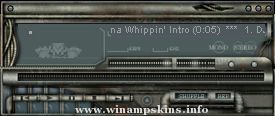
Bloodfire Chrome v1
By: Dave "Bloodfire" Hudson
December 4, 2003
Progams Used:
Corel Photopaint 11 - Skin Artwork
Microangelo - Cursors
Other Skins:
Teal Steel
Bfire_100
Bfire_100i
Mechanikill v1
Notes:
So far my favorite WinAmp Skin creation. Not much to tell about it. I wasn't inspired by anything, I just wanted something chrome and red....so here it is. Enjoy!!
Installation:
Place BloodfireChrome.wsz file into winamp skins directory, usually c:program filesskins.
Open BloodfireChrome.wsz file with winzip, (www.winzip.com, right-click file-> open with winzip), locate BloodfireChrome_01.avs and green_neb.bmp and extract to winamp avs directory, usually c:program fileswinamppluginsavs. Read instructions for activating visualizations to launch BloodfireChrome_01.avs.
Legal Stuff:
All artwork is mine and should be treated as such. If you like my work or would like permission to use it, please email me and let me know..(info-is@in-file)
______________________________________
Esta skin fue creada para:
**Mónica Rodriguez S**
Con todo el afecto que nace
de mi alma, esperando que sea de
tu agrado mi amor
Eres la mujer más Bella del mundo.
...
Title: Battle Girl
Game: Breath of Fire 2
Author: kayak
Email: info-is@in-file
For Winamp v2.91 and below.
Someone wanted more Breath of Fire 2 skins so I made another one starring Rinpoo Chuan a.k.a Katt. I found a cute picture of her somewhere ...