========================================================
RAGE AGAINST THE MACHINE v1.03
========================================================
By:..·´¯`·.¸¸.·´¯`·.¸¸.·´¯`·=[ 0oKrizo0 ]=-
E-Mail: info-is@in-file¬¬¬¬¬¬¬
¬¬ Please visit Rage Against The Machine's Website At:
http://www.ratm.com
¬¬ My Website "Evil Resurrection" At:
http://www.angelfire.com/ny2/0oKrizo0
-----------=¿?=-----------
How To Install
-----------=¿?=-----------
1. Unpack this file into your winamp skin directory
usually located in C:ProgramFileswinampSkins
2. Open Winamp, press Alt+S to open Winamp's skin directory
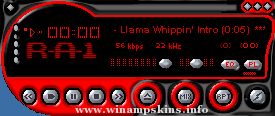
3. Pick the skin named Ratm and enjoy my Ratm skin
¤¤¤¤¤¤¤¤¤¤¤¤¤¤¤¤¤¤¤¤¤¤¤¤¤¤¤¤¤¤¤¤¤¤¤¤¤¤¤¤¤¤¤¤¤¤¤¤¤¤¤¤¤¤¤¤¤¤¤¤¤¤¤¤¤¤¤
You may Distribute this skin freely, but do not alter the file, and
this readme text must be kept intact.
If you find a mistake within this skin let me know and i'll fix it.
¤¤¤¤¤¤¤¤¤¤¤¤¤¤¤¤¤¤¤¤¤¤¤¤¤¤¤¤¤¤¤¤¤¤¤¤¤¤¤¤¤¤¤¤¤¤¤¤¤¤¤¤¤¤¤¤¤¤¤¤¤¤¤¤¤¤¤
¦-----------------------------------------------------------------¦
No more than 2 dimes of weed were smoked to create this skin.
Skin was created in 2 days so that'd be a dime a day.
If you like this skin and want to make a donation to keep the grass coming and with that along other great skins then email me.
¦-----------------------------------------------------------------¦
¬¬(c)1999 Chris..·´¯`·.¸¸.·´¯`·.¸¸.·´¯`·=[ 0oKrizo0 ]=-
http://www.angelfire.com/ny2/0oKrizo0 ``````````````
info-is@in-file
"bloo plastik"
Began: October 6, 2002
Completed: October 6, 2002
I started designing this skin a couple of weeks ago. I decided to start it today (began date), and I finished it today as well.. It was an easy skin to make.. I am very proud of w ...
Rose Tattoo
info-is@in-file
visit my website: Comkillserve
Rose Tatoo v2.9
v2.9 updated the skin for winamp 2.9
added video and media library windows.
This skin was made by Mr Tough ...
Rinoa Amp v2.0
This Winamp skin was made by me on 19-NOV-1999
The skin is based on Rinoa Heartilly from Final Fantasy VIII
To install the skin, simply unzip all the files into your winamp skins folder,
run winamp and select the skin RINOA-AMP.
...