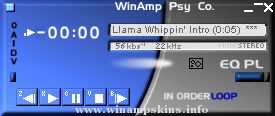
-==================================================- the Rugged skin by Jens Johansson-==================================================- January 10, 2000, Jens
-==================================================-
the Rugged skin by Jens Johansson
-==================================================-
January 10, 2000, Jens Johansson
--------------------------------------------------------
BeOS installation:
Extract the Rugged.zip archive file into the
/boot/home/config/settings/skins directory.
--------------------------------------------------------------
If you have any comments or confessions about the Rugged skin,
please e-mail them to:
---------------------------------------------------------------------
The GUI, or 'skin' of this application add-on has the look and feel of
the BeOS® MediaPlayer by Be Incorporated and such 'look and feel'
is used under express license from Be Incorporated.
Be, BeOS, and the Be and BeOS logos are registered trademarks of
Be Incorporated.
-----------------------------------------------------------------------
"bloo plastik"
Began: October 6, 2002
Completed: October 6, 2002
I started designing this skin a couple of weeks ago. I decided to start it today (began date), and I finished it today as well.. It was an easy skin to make.. I am very proud of w ...