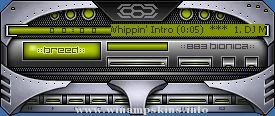
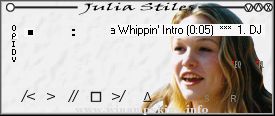
AMD Thunderbird Processor Skin Version 1.0 by Garbo 7-28-00
Sleek & stylish follow-up of my Athlon K7 skin for the AMD loyalists.
Trying to keep up with AMD is a time consuming task !
Many of the same full features as the Athlon, but maybe faster?
Thanks to AMD for their "fast forward" technology, and the Logo's,
and many thanks to all that responded to my Athlon skin !
Enjoy the design..................................
Gary Bouthillier
info-is@in-file
Tip: Spectrum analyzer best set @ fire style
0,0,0, // color 0 = black
0,0,0, // color 1 = black
0,72,47 // 2 = top of spec
0,81,52 // 3
0,91,60 // 4
0,100,65 // 5
0,110,71 // 6
0,119,78 // 7
0,128,83 // 8
0,136,88 // 9
0,145,94 // 10 = mid of spec
0,153,99 // 11
0,161,104 // 12
0,170,111 // 13
0,179,116 // 14
0,188,122 // 15
0,197,128 // 16
0,206,134 // 17 = bottom of spec
0,206,134 // 18 = osc 1
0,170,111 // 19 = osc 2 (slightly dimmer)
0,136,88 // 20 = osc 3
0,100,65 // 21 = osc 4
0,64,41 // 22 = osc 4 (dimmest)
0,206,134 // 23 = analyzer peak dots
"bloo plastik"
Began: October 6, 2002
Completed: October 6, 2002
I started designing this skin a couple of weeks ago. I decided to start it today (began date), and I finished it today as well.. It was an easy skin to make.. I am very proud of w ...
Date 4 6 2002
Softamp.
This skin is still being made, it has been downloaded from the winamp forums
Fully skined including the minibrowser and avs
Enclosed you will find a webpage winampmb.htm replace the default one in c:/Program ...
My third Winamp skin.
It's simple & glassic green !
Harmonious with 'DFX-SenseGreen'skin.
Include 'tmsVU_color' & 'albumlist_skin'
Thank you !
e-mail : info-is@in-file
[Text]
Normal=#003700
Current=#BEFFBE
NormalBG=#01830A
SelectedBG=#00A ...
Coppied from winamp/wa_dlg.h from the Winamp 2.9 ML SDK.
1) gen.bmp has a generic window frame for plugins to use.
its format is similar to the minibrowser's.
In addition gen.bmp includes a font for the titlebar, in both
...